Installation Overview
This section covers the installation of LyftData. Start by deciding which journey you are on, then follow the matching checklist below.
- For a single-host trial, follow the Evaluation Quickstart
- Prefer containers? Use Docker and Docker Compose instead of host installs
- Confirm System Requirements and Prerequisites
- Download the binary via Downloads or Prepare the binary
- Install the server on your target OS and verify it is reachable
- (Optional) add external workers, then review Configuration basics and Networking & TLS
Choose your path
- Evaluation (single host, ~15 minutes): Ideal for proof-of-concept or demos. Use the Evaluation Quickstart to bring up a server with the built-in worker, log in, and run a sample job.
- Production rollout: Plan for dedicated server and worker hosts, service accounts, and network approvals. Start with Prerequisites and follow the platform guides for every host. Budget ~45–60 minutes per host for initial provisioning (service account, binary placement, service manager wiring, validation).
Day-zero admin setup
The first server start no longer prints a generated admin password. Choose the path that matches how you are running LyftData:
| Modality | Recommended first-run path | Why |
|---|---|---|
| Local terminal on the same host | Omit --admin-init-password, keep the server on 127.0.0.1, and use the one-time setup URL shown in the ready splash or written to <staging-dir>/bootstrap/initial-admin.url. | The token stays local to the host and the browser flow is the simplest. |
systemd, launchd, or Windows service | Prefer LYFTDATA_ADMIN_INIT_PASSWORD for repeatable provisioning, or run lyftdata server create-admin --staging-dir ... locally on the host. | Service logs do not include the setup token, so headless installs are easier to automate with an explicit password or CLI creation. |
| Containers / Compose | Prefer LYFTDATA_ADMIN_INIT_PASSWORD or pre-create the admin with lyftdata server create-admin against the mounted staging volume. | Container stacks usually listen on non-loopback addresses; remote bootstrap is blocked by default until an admin exists. |
If you need to refresh a local setup link, use lyftdata server bootstrap --staging-dir ... --bind-address ... --print-url. See Configuration basics for the file, command, and URL-based options in one place.
Minimal deployments
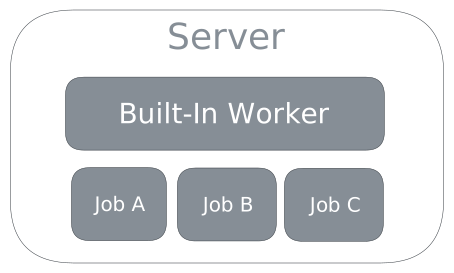
A minimal LyftData installation consists of a single server process. The server provides a built-in worker, which is used for testing jobs, but it can also run as many jobs as the server’s host resources can accommodate.
Multi-worker deployments
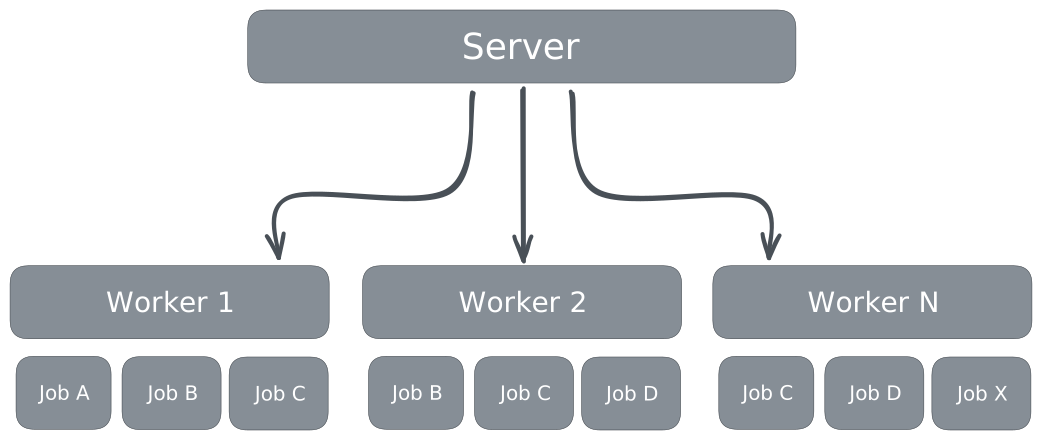
LyftData scales by deploying additional workers, and connecting them to a server. For multi-worker deployments, all jobs are managed through the server.
Workers typically run on separate hosts, but they can also run on the same host as the server, provided default worker ports are appropriately configured to avoid conflicts.
After bringing up the server and initial workers, follow the post-install checklist to enable metrics, verify health, and build your first job.
Where to go next
- Review the installation prerequisites to confirm each host is ready.
- Follow the platform guide that matches your target OS: Linux, macOS, or Windows.
- Read Workers if you plan to add external workers or scale out.
- Review Networking & TLS before exposing the UI or connecting remote workers.
- After the service is running, complete the post-install checklist and move into the Day 1 production guide.