Deployments Core Concepts
Deployments is easiest to learn when you separate data flow from control flow.
Six controls to decide independently
Section titled “Six controls to decide independently”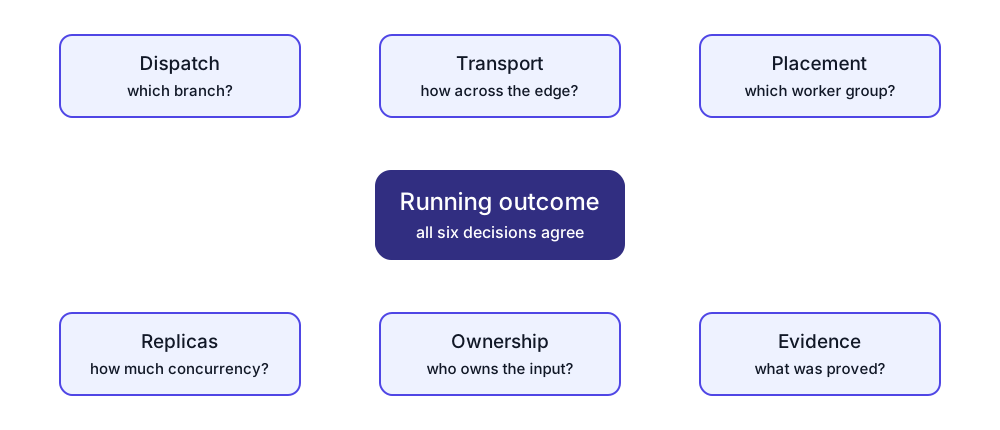
| Control | Decides | Does not decide |
|---|---|---|
| Dispatch | Which branch receives an event | How the edge recovers |
| Transport | How an event crosses an edge | Which worker runs it |
| Placement | Which worker group may run a step | Whether the input can be shared safely |
| Replicas | Desired runtime concurrency | Partition or record ownership |
| Ownership | Which consumer owns which input work | Whether an external sink accepted it |
| Evidence | What intent, apply, runtime, and destination states prove | A stronger state than was observed |
A safe design names all six. See Routing and Fan-out, Transports and Durability, and Placement and Scaling.
This page introduces a minimal set of primitives that match the current product:
- Graph (what’s wired to what),
- Data (events moving over channels),
- Trigger (signals/messages that wake things up),
- State (KV, contexts, secrets),
- Control (the Deployment Manager that plans/applies/reconciles).
Graph: steps and edges
Section titled “Graph: steps and edges”Workflow
Section titled “Workflow”A workflow is a versioned graph made of steps and edges. It is authored as a draft, then published as an immutable version.
Step (node)
Section titled “Step (node)”A step (node) is one box in the workflow graph. Each step:
- has a stable
id, - may be bound to a building block (a blueprint or workflow module),
- declares inputs/outputs (
in/outbindings), - and can optionally declare branching (
dispatch) for multi-port outputs.
Edges: channel edges vs message edges
Section titled “Edges: channel edges vs message edges”Workflows have two different kinds of “wiring”:
- Channel edges (data flow): events move from step A to step B over a named channel.
- Message edges (trigger flow): step A emits a tagged internal message, and step B runs when that tag is observed.
Message edges are for “wake up” signaling; they are not how bulk data moves.
Data: events, channels, transports
Section titled “Data: events, channels, transports”An event is the payload that flows along channel edges (what most people think of as “the data”).
Channel
Section titled “Channel”A channel is a named logical link (for example channel:orders_raw) referenced by step inputs/outputs.
Transport kind
Section titled “Transport kind”A transport defines how events are delivered along a channel edge. Two important starting points:
- Worker channel (fast, in-memory hop between jobs on the same worker).
- Durable spool (for example file-store) used as a landing zone between stages.
Durable spooling is essential for pipelines that need replay/backfill or blast-radius isolation between stages.
Ports and dispatch
Section titled “Ports and dispatch”Steps can have multi-port outputs (a map of named outputs). When a step has multiple outputs, its dispatch mode defines how events are routed:
cloneduplicates each event to all output ports,round-robinpartitions events across ports,conditionalroutes events based on a field value.
Trigger: signals, messages, request/reply
Section titled “Trigger: signals, messages, request/reply”Message bus (internal coordination)
Section titled “Message bus (internal coordination)”LyftData uses an internal message bus for coordination and signaling. It is separate from channel-based data flow.
For the concrete “emit + subscribe” mechanics (tags, filters, and the internal-messages input event shape), see Message Bus.
Message edges (trigger wiring)
Section titled “Message edges (trigger wiring)”A message edge compiles into “tag emitted” → “input triggers on tag received”. Sometimes the system inserts a relay step to convert “data events on a channel” into a tagged trigger message.
Request/reply (“serviceable”) messages
Section titled “Request/reply (“serviceable”) messages”Some internal messages are request/reply (RPC-like): the server asks a worker to do something (or report something) and expects a reply. Public docs usually don’t require the details, but it’s helpful context when debugging control-plane ↔ worker behavior.
Emit hook (data → message bridge)
Section titled “Emit hook (data → message bridge)”Jobs can emit sidecar messages (for checkpoints/backlog/progress) after a successful primary write, without changing their primary output. This is one of the bridges between the data plane and the control plane.
State: KV, contexts, secrets
Section titled “State: KV, contexts, secrets”Worker KV (memory/cache/work queues)
Section titled “Worker KV (memory/cache/work queues)”The Worker KV store is a lightweight key/value and work-queue abstraction used for:
- checkpoints and cursors,
- backlog queues with leases (at-least-once work processing),
- dedupe/idempotency tracking,
- and coordination state (for example, leader-election style locks).
Think of it as runtime coordination state. Persistence, replay, cross-worker behavior, and failure recovery depend on the selected component and topology; it is not a universal transactional store. See Delivery Semantics.
Workflow-control checkpoints are a separate concept. They let an operator release or cancel supported waiting workflow work; they do not replace an input cursor or Worker KV state. See Workflow Checkpoints.
Contexts, variables, secrets
Section titled “Contexts, variables, secrets”Deployable systems need configuration and credentials. Contexts/variables let you parameterize workflows across environments; secrets let you safely deliver credentials to workers.
Control: the Deployment Manager
Section titled “Control: the Deployment Manager”The Deployment Manager is the control plane that turns workflows into running jobs on workers.
At a high level it:
- Plans changes (expands a workflow into concrete jobs/channels and shows the diff),
- Applies the plan (stages and deploys jobs),
- Places steps onto worker groups and sets replicas,
- and Reconciles drift back to desired state.
Starter artifacts: jobs, perspectives, blueprints, workflows
Section titled “Starter artifacts: jobs, perspectives, blueprints, workflows”- Library job: a single-job starter (useful when you want “one job that does X”).
- Perspective: a starter workflow skeleton with unbound slots that you clone/complete before deployment.
- Blueprint: a reusable workflow module (building block) used inside workflows.
- Workflow: an end-to-end DAG composed of blueprints (deployable via the Deployment Manager).
Next:
- Read Workflows for how edges/transports and publishing work in practice.
- Read Routing and Fan-out for clone, round-robin, conditional, and fan-in patterns.
- Read Transports and Durability before crossing a worker or recovery boundary.
- Read Placement and Scaling before changing worker groups or replicas.
- Read Deployment Manager for plan/apply/reconcile.
- Read Workflow Checkpoints for supported operator control points.
- Read Catalog for how workflows/perspectives/blueprints and library jobs show up in the UI.